Music Audio Editor, MP3 Cutter
- 4.5
- Rating
- 50.00M
- Installs
- Free
- Price
 Analysis by App-foxy
I usually reach for a mobile audio editor when I need to solve one small problem quickly: trim a recording, clean up a song clip, remove a vocal part, or make a rough mix without opening a desktop program. Music Audio Editor, MP3 Cutter fits that practical role well. It is a free Music & Audio app from Video Screen Recorder, Voice Audio Editor, Cut MP3, and its broad toolset makes it more useful than its short store label suggests.
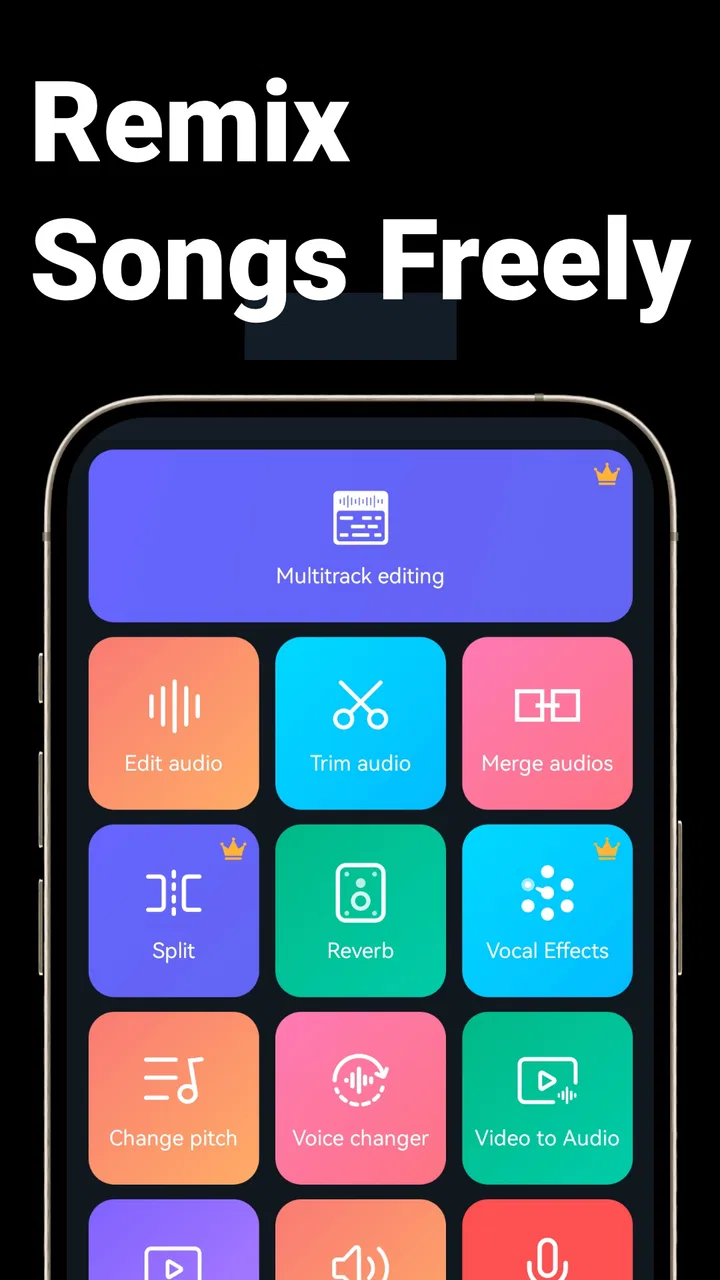
My first impression was that this is not trying to be a full recording studio in your pocket. It is better understood as a collection of focused audio tools gathered into one Android app. You can move between cutting, editing, recording, changing a voice, removing vocals, and making simple song arrangements. That range is the main reason I would recommend trying it, especially if you often handle audio files on your phone rather than transferring everything to a computer.
The app is free to install, carries an Everyone content rating, and has reached over 50 million installs. Its average rating is 4.6 from around 1.4 million ratings, with roughly 18 thousand written reviews, so it is clearly familiar to a large Android audience. Those figures do not make it perfect, but they do match my experience of an app designed for quick, repeatable edits rather than specialist production.
You May Also Like

 Blood Strike: 2.5 Anniversary
Blood Strike’s Loadouts Turn Every Drop Into a Tactical Gamble
A close look at Blood Strike’s custom loadouts: how fast access to signature weapons reshapes its battle royale rhythm, rewards preparation, and narrows the gap between fights.

 Pandora - Music & Podcasts
Pandora’s Music Is Easy to Start, but Harder to Recover
Pandora’s strength is its low-effort path from a seed to a station. Its weak spot is how much confidence it asks you to place in connection, setup, and quiet recovery.

 8 Ball Pool
 Is Built on Rivalries, Rematches, and Routine
A close look at the rivalries, rematches, shared routines, and unanswered safety questions that turn a quick pool match into a persistent mobile community.

 Samsung Music
’s Quiet Strength Is Playing What You Already Own
Its reach comes less from spectacle than from dependable access to a personal library. That simplicity is both the app’s strongest retention engine and its ceiling.

 AccuWeather: Weather Radar
AccuWeather Review: A Quick, Clear Forecast for Everyday Decisions
For everyday plans, the best forecast is the one you can understand quickly. AccuWeather makes rain timing, radar, and local conditions easy to act on, with a few trade-offs.

 Hill Climb Racing
Why Hill Climb Racing Still Turns Crashes Into One More Run
A tiny car, a bumpy hill and one more upgrade: Hill Climb Racing keeps resurfacing because its simple chaos makes every near-miss feel personal.
More From Our News Desk
View All News


How I use it for everyday audio jobs
I use this section to focus on the small decisions that make everyday edits easier: choosing the right source, checking a cut by ear, and keeping a clean original so experiments remain reversible. Those habits matter most when I’m moving quickly between a voice note and a music clip. From there, I’ll look at the setup checks that can prevent avoidable snags.
A simple workflow that avoids unnecessary steps
I find the best way to use this editor is to begin with the outcome, not with the entire feature list. If I need a shorter file, I go straight to the cutting tool. I choose the source audio, inspect the waveform, move the start and end points, and listen back before saving. That sounds basic, but the preview step matters: a cut that looks correct visually can still remove the beginning of a word or leave an awkward breath at the join.
For a ringtone or notification sound, I would first make a working copy of the original file outside the editing process if the source matters. Then I trim the copy, leave a little space around the sound, and listen through headphones as well as the phone speaker. Small speakers can hide a click or make a sharp ending seem smoother than it really is. This habit is more valuable than repeatedly changing the same file and losing track of which version is the clean one.
The same approach works for voice recordings. I would record a short section, stop, listen, and only then decide whether the full take is worth keeping. If the recording is for a message, a spoken note, or a simple video project, the editor can help shorten silences and remove obvious mistakes. It is not a replacement for a dedicated speech-cleaning workstation, but it is convenient when the source and the finished file are both on the phone.
One realistic use case is preparing a short audio clip for a family video. I might record a relative explaining a story, remove the long pause at the beginning, cut away a false start, and combine the useful section with a music bed. The important trick is to keep the spoken voice louder than the music. A mix can sound exciting in the editor and become difficult to understand once played through ordinary phone speakers, so I check the result at a modest volume before sharing it.
What the main tools are actually good for
The MP3 cutter is the most immediately useful part for many people. It suits short edits, extracts, and personal audio organization. I would use it to isolate a chorus for a practice session, shorten a long recording, or prepare a sound for a personal project. It is less suitable when I need precise multitrack timing, detailed automation, or a large arrangement with many independent clips.
The mixer and song-making tools are more useful for sketches than finished commercial tracks. I can imagine combining a voice recording with a backing part, testing how two ideas fit, or making a quick demo to send to someone. The advantage is speed: I do not need to learn a large desktop interface just to hear whether two sounds work together. The trade-off is that a phone-based workflow gives me less control when the arrangement becomes crowded.
The vocal remover is worth treating as an experiment rather than a guaranteed karaoke solution. Removing vocals from a finished song depends heavily on how that song was mixed. A centered vocal over a relatively simple stereo arrangement may produce a usable result, while layered effects, backing vocals, bass, or instruments placed in the center can remain or become damaged. I would always preview the processed file and keep the original untouched.
The voice changer is a playful tool for messages, sketches, and personal experiments. It can make a recording feel different without requiring another app, but I would not confuse an effect with professional voice design. If the goal is a clear narration, I prefer recording naturally and editing the timing first. Effects are most convincing when used sparingly; applying them to every line can make a short clip tiring to hear.
Settings and preparation that save time later
The most useful “advanced” improvement is not a secret button. It is preparing the audio before editing. I check that I am working on the intended file, listen to the source once, and decide whether I am cutting, cleaning, changing, or mixing. This prevents a common mistake with all-in-one editors: opening the first attractive tool and then forcing the audio into the wrong workflow.
I also recommend saving edited versions with clear names rather than repeatedly overwriting the source. A name that includes the purpose, such as “voice-short” or “music-no-vocal,” makes later sharing much easier. This is especially important when testing the vocal remover or voice effects, because the processed result may be useful for one purpose but unsuitable for another.
Before exporting, I check three things: the beginning, the ending, and the loudest section. The beginning reveals whether the cut starts too abruptly. The ending shows whether the final sound stops naturally. The loudest section tells me whether the mix has become unpleasant or whether the voice has been buried. This three-point check is quick and catches more real-world problems than staring at the waveform for too long.
Because the app supports several kinds of audio work, I would not assume that one setting suits every file. A spoken recording needs intelligibility, while a music clip needs a more natural sense of continuity. A voice-changing effect may be acceptable for entertainment but distracting in an instructional recording. I make the decision based on where the finished audio will be heard, not just on how dramatic the preview sounds.
Repeatable habits for faster editing
Experienced use comes from repeating a small sequence. I select the source, make the rough edit, preview it from slightly before the change, adjust the boundary, and then listen to the complete result. Starting playback just before a cut is faster than replaying the entire file every time, and it helps me judge whether the transition feels intentional.
For several clips, I handle them one at a time and finish the naming and saving step before opening the next. That may seem slower, but it reduces mix-ups between similarly named recordings. If I am making a group of short sounds, I use the same listening routine for each one: headphones for detail, phone speaker for practical use, then a final check after saving.
When mixing, I begin with fewer elements than I think I need. A voice plus one backing track is easier to balance than a crowded arrangement, and it gives me a clear reference for the level of each part. If the result works with two layers, I can add another sound carefully. If it already feels busy, adding more processing usually makes the problem harder to diagnose.
Another useful habit is separating creative decisions from technical decisions. First I decide where the clip should begin and end. Then I decide whether it needs a voice effect or vocal removal. Finally I judge the balance and the saved result. Changing all three at once makes it difficult to know which adjustment improved the audio and which one caused the new problem.
Where the app starts to show its limits
My biggest reservation is that the breadth of the toolset can create expectations the app cannot always meet. A phone editor can be excellent for short tasks, but detailed production requires more than cutting and combining files. If I needed deep control over individual tracks, highly exact timing, complex sound design, or a long-form project with many revisions, I would move to a more specialized audio workstation.
The vocal remover has a particularly important limitation: it works on the finished stereo mix rather than returning the original studio tracks. That means unwanted parts can remain, and desired instruments can lose some body. I would use it for practice, rough karaoke, or experimentation, not for assuming that any song can be separated cleanly.
Likewise, a voice changer can alter the character of a recording, but it cannot repair poor microphone placement, heavy background noise, or unclear speech by itself. Recording closer to a quiet source and speaking clearly will usually help more than choosing a stronger effect. This is one of those cases where better preparation beats more processing.
The app is also not my first choice for people who want a carefully managed music library or a professional mastering workflow. A dedicated player is better for organizing and listening, while desktop software is better for long sessions and precise production. Music Audio Editor, MP3 Cutter sits between those options: more capable than a basic file cutter, but more approachable than a full studio environment.
Who should install it, and who should skip it
I think it is a good match for Android users who want to trim MP3 files, edit recordings, try a vocal-removal effect, make a quick mix, or change a voice without juggling several separate apps. It is especially convenient for students, casual creators, family-video editors, and anyone who handles audio spontaneously. The free entry point makes it easy to test the workflow before deciding whether the optional purchases are worthwhile; individual in-app purchases range from $0.99 to $19.99.
I would skip it if my main goal were professional multitrack production, exact restoration, or a polished release-ready master. I would also choose a simpler tool if I only needed to cut one file once and had no interest in the other functions. The wider feature set is useful when I actually need several audio jobs, but it can feel excessive for a single tiny edit.
Compatibility is straightforward for many Android phones because the minimum operating system is Android 6.0. The current version is 2.8.3.1, so I would still check the app page on my particular device before starting an important project. For ordinary personal edits, the platform requirement is not an obstacle for relatively recent phones, but older hardware may make larger or more involved tasks less comfortable.
My verdict after using the full workflow
What I like most is the practical combination of tools. I can move from a recording to a trimmed clip, test a voice effect, or build a quick mix without leaving the same app. That matters when the job is small and time matters more than a perfect studio interface. The editor rewards a disciplined routine: work from copies, preview every boundary, keep mixes simple, and judge the saved file on the device where it will actually be heard.
The strongest reason to use this app is convenience with enough creative flexibility for everyday audio. It is not the tool I would choose for demanding production, but it is more capable than a basic MP3 cutter and less intimidating than a professional workstation. The vocal remover and voice changer are best viewed as useful creative options with real limitations, not as magic buttons.
For me, that makes Music Audio Editor, MP3 Cutter a sensible free download for Android users who regularly need quick audio edits and occasional mixing. I would install it for practical editing, keep expectations realistic about automatic processing, and develop a repeatable save-and-preview habit from the beginning. Used that way, it can handle a surprisingly broad set of small audio jobs without making each one feel like a technical project.
The developer behind it is Video Screen Recorder, Voice Audio Editor, Cut MP3, and the app belongs in the Music & Audio category. It was released on April 9, 2019, and its Everyone rating makes it accessible for general personal use. My final recommendation is simple: try it if you want several mobile audio tools in one place, but choose a dedicated alternative when precision, deep track control, or professional finishing is the priority.
FAQs for Music Audio Editor, MP3 Cutter
01What features does the Music Audio Editor, MP3 Cutter app offer?
The Music Audio Editor, MP3 Cutter app provides a range of features, including trimming and merging audio files, adjusting volume levels, and adding effects. Users can also convert audio formats and create ringtones. The interface is user-friendly, allowing even beginners to edit their audio files with ease.
02Is the app free to use, or are there any in-app purchases?
The app is free to download and provides basic editing features at no cost. However, it offers in-app purchases that unlock advanced features, such as premium effects and ad-free usage. Users can choose to upgrade depending on their editing needs and preferences.
03How user-friendly is the app for beginners in audio editing?
The app is designed with an intuitive interface that is easy to navigate, making it suitable for beginners. It offers tutorials and tips to help new users understand the editing tools available. Even without prior experience, users can quickly learn to cut, merge, and edit audio files.
04Can I use the app to edit audio files from different sources?
Yes, the app supports a variety of audio file formats, allowing you to import files from different sources such as your device storage, cloud services, or directly from recordings. This versatility makes it easy to work with various audio files, regardless of their origin.
05What are the limitations of the Music Audio Editor, MP3 Cutter app?
While the app offers a wide range of features, some advanced editing options are only available through in-app purchases. Additionally, the free version includes ads that may interrupt your editing experience. Users seeking a more comprehensive suite may need to consider upgrading.
Pros
- User-friendly interface for easy navigation.
- Supports a wide range of audio formats.
- Fast processing speeds for quick editing.
- Includes advanced audio effects and filters.
- Allows precise audio trimming and merging.
Cons
- Contains ads that may disrupt workflow.
- Limited features in the free version.
- Requires in-app purchases for full access.
- Occasional bugs in large file editing.
- No cloud integration for file saving.

Music Audio Editor, MP3 Cutter
Gallery